Fake Email browser extensions
You need a throwaway address exactly when you have no time for one: the sign-up form is already open and the code is expected now. The extension takes everything unnecessary out of that path — the address sits in your toolbar, a counter on the icon tells you mail has arrived, and the alert reaches you even when the site is not open in any tab.
In short: the site answers “give me an address”, the extension answers “tell me when the mail arrives”.
What it does
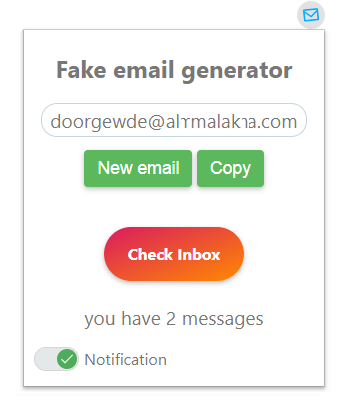
There is an extension for Google Chrome. It keeps the address one click away in the toolbar, shows a counter on the icon when something arrives, and can pop up an alert without the site being open in any tab.
Get it from the Chrome Web Store
What it does:
- waits for new mail in real time;
- opens the current mailbox in one click;
- generates a new address without loading the site first;
- shows a badge on the icon and, optionally, a popup alert.
Any other browser: you do not need an extension for alerts
This is the part people miss. Popup notifications are built into the site itself — turn them on in Settings, allow notifications when the browser asks, and alerts arrive while the tab sits in the background. No extension involved, and it works in every browser that supports web notifications.
What each switch does — including how to stop a burst of messages producing a burst of alerts — is in the settings guide.
What the extension does not change
It is a faster way to reach the same mailbox — not a different mailbox. The address still lasts a few days, still has no password, and is still readable by anyone who knows it. If you want an address that outlives that, use a domain of your own.
Found a bug or want something added? , or use the Feedback link in the footer.