Facebook rejected your fake email address
You typed the address, pressed sign up, and Facebook answered with this:
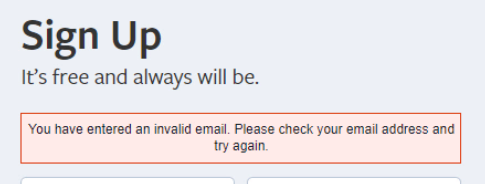
The address is not invalid, and nothing is broken
The wording is misleading. Facebook is not saying the address is malformed or that the mailbox does not exist — it is saying it recognises the domain and has decided not to accept sign-ups from it. That is a policy list on their side, refreshed whenever they feel like it.
Two consequences follow, and both are useful:
- Re-typing the same address, changing the username, or waiting an hour changes nothing. The decision was made on the part after the
@. - A domain that was refused last month may be accepted today, and the other way round. There is no permanent list to memorise — on either side.
What to try, in this order
- Change the domain, not the username. Open the domain list on the front page and pick a different one. This is the whole reason more than one is offered.
- Prefer a domain that is not famous. The better known a fake email domain is, the more likely it is already on somebody’s list. A quiet domain with a country code often walks straight through.
- Check the domain can receive mail at all before you rely on it.The domain debugger reads the live DNS and tells you whether mail can physically reach it. That separates “Facebook refuses this domain” from “this domain is not working at all” — two problems that look identical from the sign-up form.
- Use a domain of your own. Nobody has had a chance to put it on a list yet, and it stays yours. How to attach one — it is one MX record.
Why there is no button here that hands you a working address
This page used to offer one: press a button, receive an address that Facebook accepts. It is gone deliberately, and the honest reason is worth stating.
Such a list is true for about as long as it takes to publish it. The moment a domain becomes the one everybody is handed, it is the one that gets added to the block-list first — so the button would be at its most useless exactly when it looked most popular. Worse, it fails quietly: you would blame your account, your browser, or yourself, rather than a stale list.
Checking a domain on demand answers the same question and stays true, because it measures instead of remembering.
If you have not started yet
This page assumes you already hit the refusal. The full sequence — incognito window, matching the name to the country, confirming the code — is in Fake Email for Facebook.
If it was some other site
Facebook is the one asked about most often, but the refusal itself is not specific to it, and neither is the way out. The general case is here — including the other half of the problem, where the form takes the address without complaint and the message still never arrives.